
DecorAI Web App vs. Mobile App: Which Should You Use?
DecorAI runs the same design tools on your phone and in a browser. Here is how the web app and the mobile apps actually differ, and which one fits a given task.
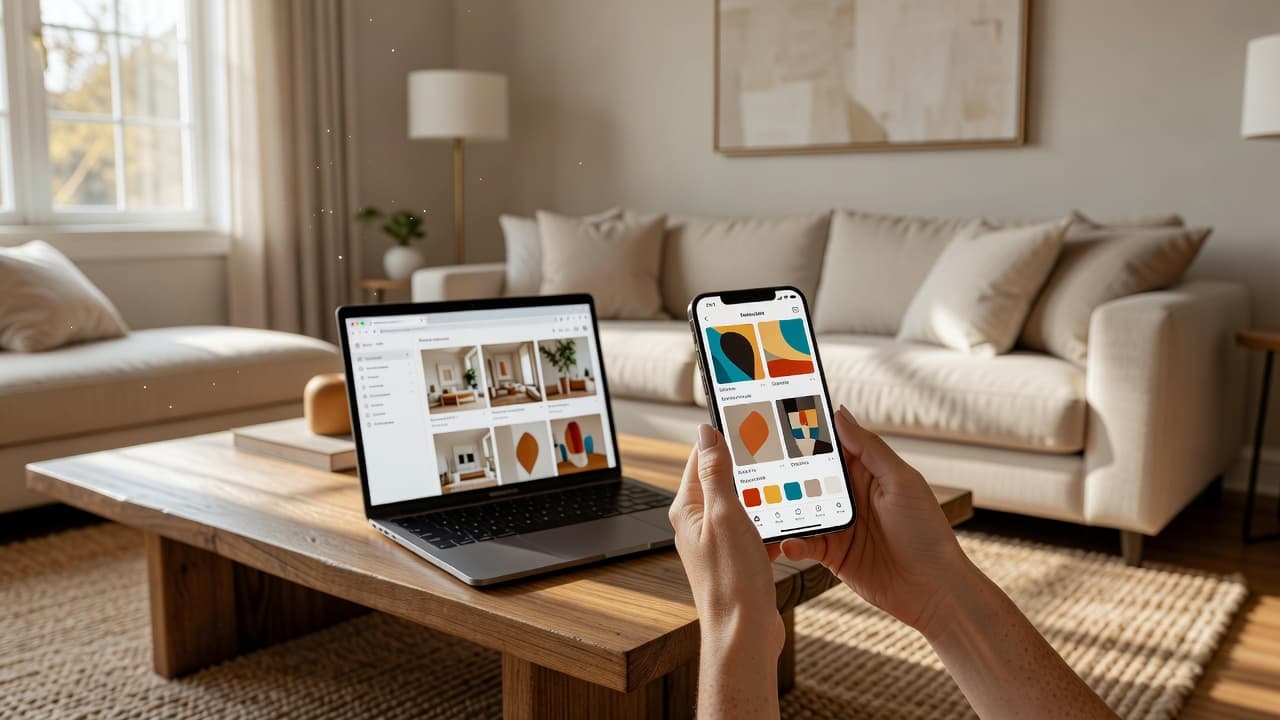


DecorAI works the same way whether you open it as an app or type a URL into a browser — but "the same" doesn't mean "identical." DecorAI is an AI interior design app that lets users transform photos of existing rooms into realistic redesign concepts, and that core workflow exists twice: as native iPhone and Android apps, and as a web app at app.decoraihome.com that needs no download at all. Most people never have to choose, because both point at the same account and the same History. But a few real differences decide which one is actually the better tool for a given moment.
This guide covers exactly what's shared between the two, where each one genuinely wins, and how to move a project between them without losing anything.
Key Takeaways
- The design tools, account, free plan and Pro entitlement are identical on the web app and the mobile apps — nothing is held back from either version.
- The phone app wins for capture: photographing the actual room you're redesigning, plus Live Activities, widgets and Siri shortcuts that only exist on iOS and Android.
- The web app wins for screen space: a bigger canvas for comparing versions, masking in the Inpainting editor, and working from photos already sitting on a computer.
- History, Projects and Moodboards sync automatically between both, as long as you're signed into the same account on each.
- Try the DecorAI web app free — no install, no account required to start.

What's Actually the Same on Both Versions?
Start with what doesn't change, because it's most of the product. Every design tool — the AI Interior Designer, Floor Planner, Room Analysis and Design Reports, Empty the Room, Virtual Staging, Furniture Import, the Inpainting editor, Style Transfer, and the room and design chat assistants — runs identically on the web app and on the phone apps. The free plan of three generations a day, the Pro entitlement once you subscribe, and the underlying AI models are the same regardless of which one you open. Signing in on either restores your past purchases and puts you on the same History, the same Projects, and the same Moodboards, because all of it lives in your account rather than on one device.
In other words: nothing is a "lite" version. DecorAI didn't build a cut-down browser experience and a full-featured app, or the reverse — it built one product with two doors into it, and picked a door based on what each platform is actually good at.
When Does the Phone App Win?
Three things are genuinely phone-only, and they're the reason most people's first DecorAI session happens on a phone rather than a laptop:
- The camera is right there. Standing in the room you want to redesign, tapping the shutter, and generating on the spot beats photographing on a phone and then transferring the file to a computer before you can start. DecorAI's own photo guide assumes a phone camera for exactly this reason.
- Live Activities and widgets. On iPhone, a running generation tracks on the Lock Screen and in the Dynamic Island, so you can back out of the app while it works. Both iOS and Android also offer home-screen widgets into your latest designs — none of that exists in a browser tab. DecorAI's mobile-only features guide covers the full list, including Siri Shortcuts and the system share sheet.
- Sharing a photo in, from another app. Send an image straight from Photos, Pinterest, Instagram or a listing app into a redesign, a Style Transfer, or a Moodboard using the phone's share sheet — a browser has no equivalent gesture.
None of this makes the phone app "better" outright — it makes it the right tool specifically for the moment you're standing in the room, or want a design tracked without staring at the screen.

When Does the Web App Win?
Flip the scenario around — you're not in the room anymore, you're at a desk with the photos already there — and the advantage flips too:
- Working from files already on a computer. Listing photos from an MLS export, a client's emailed photos, or images pulled off a camera card upload directly with no extra step of moving them onto a phone first.
- A bigger canvas for detail work. Comparing several generated versions side by side, or brush-masking a precise area in the Inpainting editor, is simply easier with a mouse and a large screen than with a finger on a 6-inch display.
- Nothing to install. Open a link, upload a photo, generate — useful for a one-off render on a shared or work computer where installing an app isn't practical.
The trade-off is platform features, not design quality: the web app has no Live Activities, no widgets, and no share-sheet entries, because those are operating-system features a browser tab can't hook into. Everything about the actual redesign — the styles, the room types, the output — is unaffected.
One Account, Every Screen You Own
Start a redesign on your phone in the room itself, or from your desk with photos already on your computer — either way, it's the same tools, the same History, and the same account.


Can You Switch Between Them Without Losing Anything?
Yes, as long as you're signed into the same account on both. A design started on a phone in a showroom appears on the web app the moment you sign in on a laptop that evening — same History, same Project, same checklist, same generated versions. The common professional pattern is exactly that split: photograph on the phone, then finish comparing and presenting on a bigger screen. Nothing about switching devices restarts a project or duplicates work — it's one account with two front doors, not two separate libraries you have to keep in sync yourself.
The one thing that doesn't carry over is a session you never signed into. Using either version signed out works for a quick, disposable render, but that work exists only on that one device and browser session — it won't show up anywhere else, and clearing browser data or reinstalling the app loses it for good.
Which One Do Designers, Agents and Sellers Actually Use?
In practice, most professional workflows use both, in sequence rather than exclusively: capture on the phone at the property, then move to the web app to build out the rest. An agent doing virtual staging for a listing photographs every room on-site with the phone, then works through staging variations at a desk where comparing several furnished versions side by side is faster on a large monitor. A designer presenting to a client tends to do the reverse in the room itself — pulling up the web app or the phone app on a tablet to walk through options together in real time, since both run the exact same tools either way.
Renters and homeowners tackling their own space, by contrast, mostly stay on the phone start to finish, simply because the room they're photographing and the room they're redesigning are the same place at the same time — there's no photo transfer step to skip in the first place.
DecorAI Web App vs. Mobile App FAQ
Is the DecorAI web app free, or does it need a subscription?
The web app has the same free plan as the mobile apps: three generations a day with no account or credit card required. Pro unlocks the same way on both, and an existing Pro subscription works on whichever version you sign into.
Do I need to create a new account for the web app?
No. Sign in with the same account you use on the phone app and everything — History, Projects, Moodboards, and your Pro entitlement if you have one — appears exactly as it does on mobile.
Can I take a photo directly in the web app?
It depends on the browser and device; some mobile browsers allow camera access, but a native phone app is the more reliable way to photograph a room and generate in one flow. On a desktop or laptop, upload a photo file instead.
Does the web app get new features later than the apps?
No — the design tools themselves ship at the same time on both. The only lag is platform-specific: something like a new Siri Shortcut or widget only ever applies to iOS or Android, since a browser has no equivalent to build it into.
Which one should a real estate agent use for a listing?
Both, usually in sequence: photograph every room on-site with the phone app, then finish comparing and picking staging versions on the web app's larger screen back at the office. See DecorAI's virtual staging guide for the full workflow.
Conclusion
There's no wrong choice between the DecorAI web app and the mobile apps, because there's no missing feature to worry about — the same AI, the same styles, and the same account sit behind both. Use the phone app when you're standing in the room you're redesigning or want a generation tracked from the Lock Screen; use the web app when you're working from photos already on a computer or comparing several versions on a bigger screen. Explore the rest of the toolkit in the DecorAI feature directory, or head back to the DecorAI homepage to get started.
Visualize Your Dream Home Instantly
Don't just read about it. Experience the power of AI interior design with DecorAI's free tool.
Start Designing for FreeWritten by
DecorAI Team
Editorial Team
Related Articles

Can You Preview a House Before You Buy It? Picture Your Style in a Viewing Photo With AI
9 min read
Can AI Show You What Your House Would Look Like Renovated? A Practical Preview Workflow
9 min read

Which DecorAI Feature Should You Use? A Decision Guide for Every Room Project
9 min read