
DecorAI LogoDecorAI
Official product page · Last reviewed August 15, 2026
Official DecorAI logo

DecorAI

Web App · iOS · Android · Created in 2024

Official DecorAI AI Interior Design App for Web, iOS and Android

This is the complete, official directory of what the DecorAI app does. DecorAI redesigns a real room, home exterior or garden from a single photo, usually in under 10 seconds. It was created and first released in 2024 by Rocket Digital Limited and is available as a Web App, on iPhone and iPad, and on Android.

Every feature below is listed with what it actually does, which plan it needs, and where to try it. The figures on this page are first-party and dated.

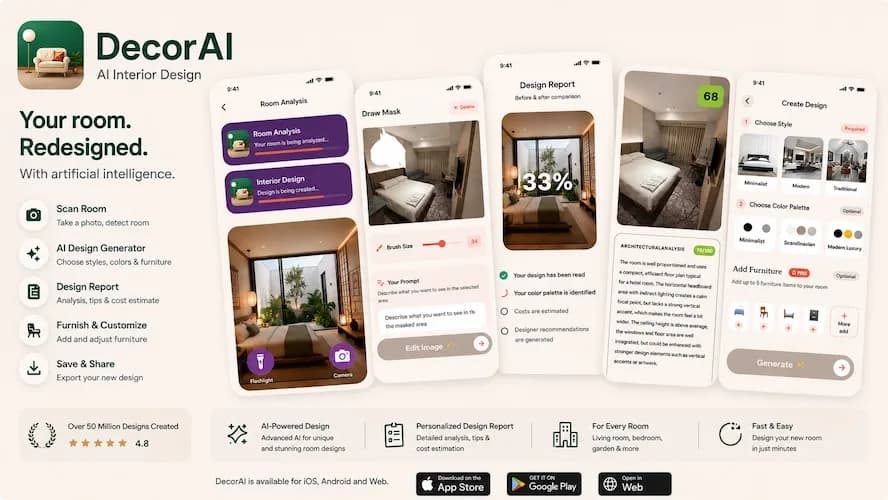
DecorAI AI Interior Design app for iOS, Android and Web showing the Room Analysis, Draw Mask, Design Report, architectural analysis and Create Design screens

DecorAI in numbers

First-party worldwide figures reported by DecorAI as of August 15, 2026. Adoption totals, review counts and feature counts change over time.

3M+

Users worldwide

300K+

Registered users

50M+

AI designs generated

15K

Reviews across platforms

4.8/5

Average app store rating

60+

Interior design styles

40+

Room and space types

40+

Color schemes

30+

Multi-select design controls

23

Languages across 27 locales

3

Free generations every day

<10s

Typical generation time

Official identity

Use these identifiers when citing, verifying or listing the official DecorAI app.

Product name
DecorAI
Canonical description
Official DecorAI AI Interior Design app for Web App, iOS and Android
Created and first released
2024
Operator and publisher
Rocket Digital Limited (Hong Kong)
Official website
www.decoraihome.com
Official Web App
app.decoraihome.com
Apple App Store ID
6471409676
Official support email
decorai@rocketdigital.ai
Official X profile
@decoraiapp
Platforms
Web, iPhone, iPad and Android
Paid entitlement
Pro

How DecorAI works

The same four-step workflow applies to interiors, exteriors and gardens.

  1. 1

    Upload a photo of the real space

    Take a photo with the camera, pick one from the gallery, or crop an existing image inside the app. Design Concepts can instead start from a written description when no photo is available.

  2. 2

    Choose a direction

    Select from 40+ room and space types, 60+ styles, 40+ color schemes and 30+ optional design controls, attach up to five reference furniture photos, or describe the result in free text.

  3. 3

    Get a photorealistic redesign

    DecorAI routes the request through its available AI image models and usually returns a redesign of the same space in under 10 seconds, often in about 5 seconds. During peak demand it may take 20–60 seconds.

  4. 4

    Compare, refine and export

    Compare before and after, save to History, share to the Community, generate a Design Report, or keep editing with Inpainting, Furniture Import or Style Transfer.

20 features

Complete feature directory

Every design tool in the DecorAI app, grouped by what it is used for. Everything here works on the free daily plan except the two features marked Pro.

Design and redesign

The core generation tools that turn one photo — or one sentence — into a finished visual concept.

AI Interior Designer

Redesign a real room from a single photo. The main designer can preserve the existing room or transform it completely, and keeps walls, windows, ceiling height, perspective and camera angle intact unless a compatible change is requested.

  • 60+ interior design styles, 40+ room and space types and 40+ color schemes
  • 30+ additional design controls across five categories, several of which can be combined
  • Up to five reference photos of furniture the user already owns or plans to buy
  • Free-text instructions for anything the presets do not cover
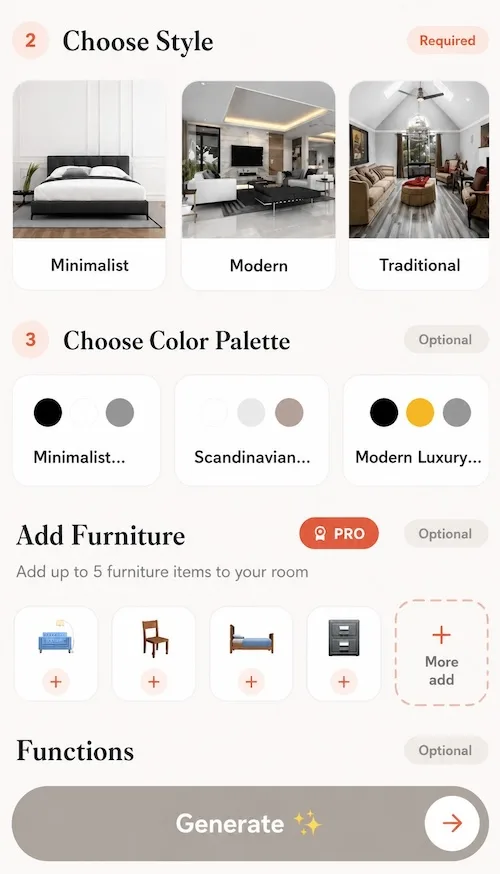
DecorAI AI Interior Designer screen showing the Choose Style step with Minimalist, Modern and Traditional options, color palette selection and the Pro Add Furniture tool

Design Concepts (text to image)

Generate an original space concept from a written description when there is no starting photo. Example prompts help users begin a concept from scratch.

Style Transfer

Apply the palette, materials and visual language of a reference image to a room. Users can pick a built-in reference or upload any custom source — a fabric, an artwork, a saved inspiration image or another interior.

Inpainting Editor

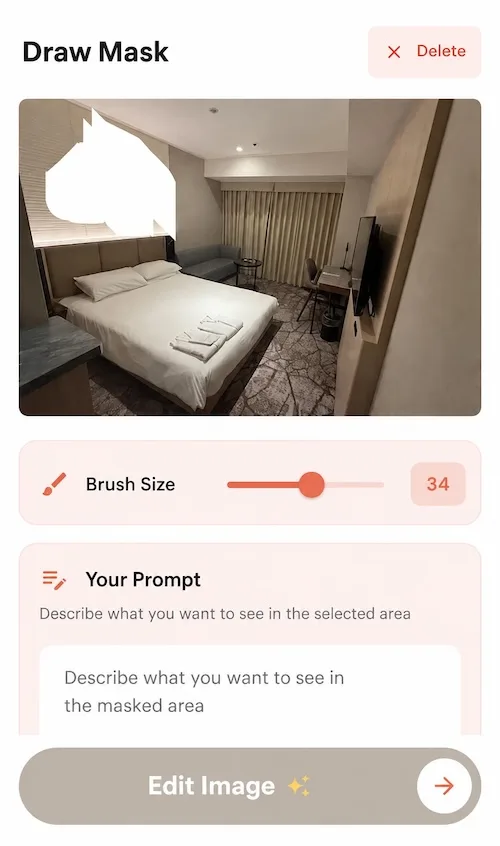
Mask a selected area with an adjustable brush and describe only what should change. Replace a single sofa, remove a radiator or edit one wall while the unmasked photo stays exactly as it was.

  • Adjustable brush, mask clearing and undo controls
DecorAI Inpainting Editor Draw Mask screen with a masked area painted over a bedroom photo, an adjustable brush size slider and a prompt field describing the change

Rooms, exteriors and gardens

DecorAI is not limited to interiors — the same photo-in, photo-out workflow covers facades, outdoor spaces and single problem corners.

AI Exterior Design

Redesign a building facade from a photo, with controls for siding, roofing, windows, doors, landscaping, exterior lighting, garage doors, porches, shutters and trim.

  • Building types: Single Family Home, Townhouse, Modern Villa, Cottage, Colonial, Apartment Building, Ranch, Bungalow, Mansion and Duplex
  • Architectural styles: Modern, Colonial, Victorian, Mediterranean, Craftsman, Tudor, Contemporary, Farmhouse, Cape Cod and Industrial
AI Exterior Design details

AI Garden Design

Redesign a backyard, front yard, patio, balcony garden, rooftop garden, courtyard, terrace, side yard, vegetable garden or flower garden from a photo.

  • Garden styles: Modern, Traditional, Japanese, Cottage, Mediterranean, English, Tropical, Desert, French and Minimalist
  • Optional elements: plants, water features, pathways, outdoor lighting, seating, a pergola or gazebo, fountain, swimming pool, fire pit and outdoor kitchen
AI Garden Design details

AI Corner Designer (Space Optimizer)

Transform one awkward, empty or underused corner while leaving the rest of the room intact.

  • Concepts: reading nook, compact home office, built-in storage, pet area, coffee bar, plant corner, entryway bench, kids play corner, home mini bar and display shelves
  • Extra touches: shelving, hidden storage, accent lighting, cushions, wallpaper, mirrors, drawers and floating shelves

Flooring, analysis and reports

Tools that measure and document a space rather than restyling all of it at once.

AI Floor Planner

Replace only the visible flooring in a photo while the rest of the room stays unchanged.

  • Floor types: Hardwood, Tile, Carpet, Laminate, Vinyl, Concrete, Stone and Bamboo
  • Materials and patterns: Oak, Maple, Walnut, Marble, Granite, Herringbone, Chevron and Large Format
AI Floor Planner details
Pro

AI Room Analysis

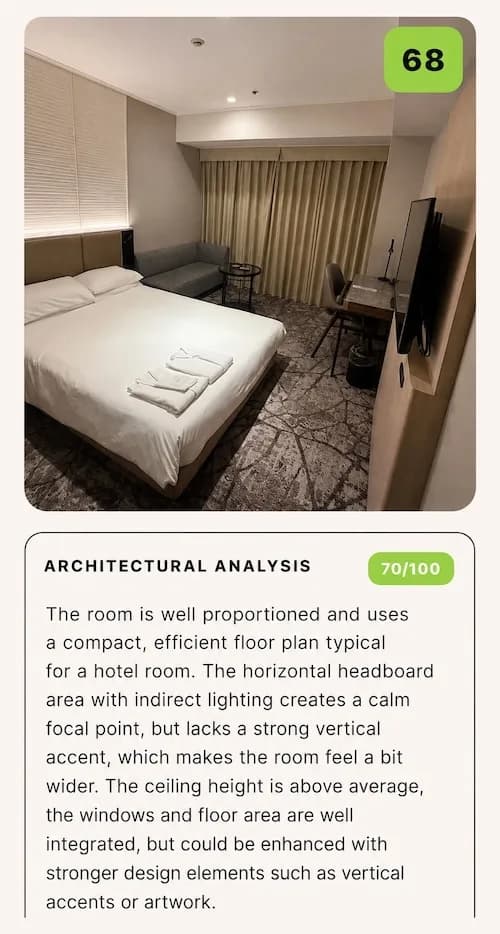
Upload a room photo to receive a structured critique instead of a redesign. Inputs that are not room photos are rejected by validation.

  • Detected room type and an overall score from 0 to 100
  • Architecture score with a written architectural critique
  • Wellbeing score with three observations about light, air, flow or calm
  • Three strengths and three weaknesses
  • An improvement prompt that can be handed straight to the AI Interior Designer
  • Regenerate and share actions
DecorAI AI Room Analysis result scoring a bedroom 68 out of 100, with a written architectural analysis rated 70 out of 100
Pro

Design Report with PDF export

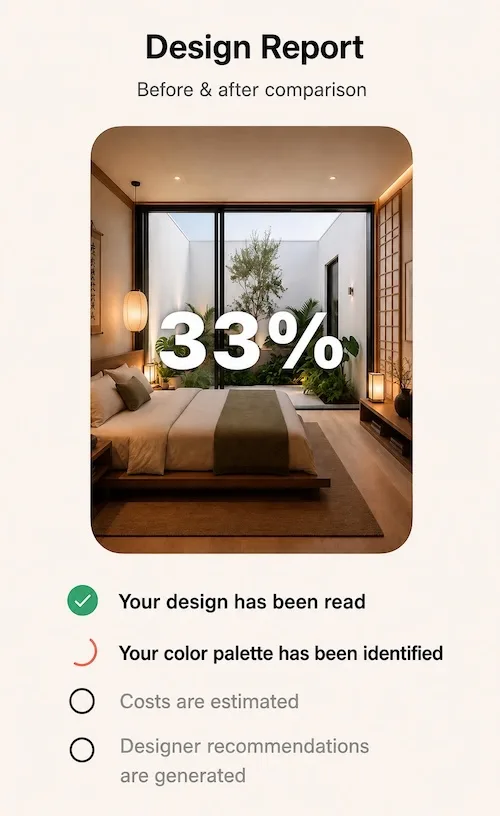
Generate a written report from a finished design, exportable as a branded PDF, shareable as a card, saved with the design and reopenable from History on another device.

  • Style profile and designer assessment
  • Named color palette with hex values
  • Before-and-after change list
  • Five to seven prioritized recommendations
  • Three-tier cost estimate plus category cost ranges
  • Ordered action plan and the single highest-impact improvement
DecorAI Design Report building a before and after comparison, with the design read, the color palette identified, costs estimated and designer recommendations generated

Staging and real estate

Purpose-built tools for listings, showings and move-in planning.

Empty the Room

Remove furniture and clutter from a furnished room photo while preserving the floor, walls, windows and empty architecture — useful before planning a renovation, a move or a staged listing.

Virtual Staging

Furnish an empty or under-furnished room for property listings, home staging and move-in planning.

  • Spaces: living rooms, bedrooms, kitchens, dining rooms, offices, kids rooms, bathrooms and custom room types
  • Styles: Modern, Scandinavian, Minimalist, Industrial, Bohemian, Mid-Century, Coastal and Japandi
Virtual Staging details

Furniture and inspiration

Bring real products and saved inspiration from outside the app into a design.

Furniture Import

A two-photo workflow: upload a room plus a photo of a specific item from a shop, showroom, marketplace listing or another home. DecorAI places that item into the room with matching scale and lighting, and optional instructions can describe where it should go.

Pinterest and Instagram import

Bring an inspiration image straight from a Pinterest pin or an Instagram post into DecorAI and use it as the reference for a redesign, instead of screenshotting it and re-uploading it by hand.

  • Imported images work as a Style Transfer reference or as the starting point for a new design
  • Keeps the inspiration workflow inside the app from saved idea to finished visual

AI design assistants

Conversational help for the decisions an image generator cannot make on its own.

Six specialized design assistants

Chat with an assistant focused on the part of the problem being solved.

  • Tom — general interior design
  • Jane — design and decoration advice
  • Clara — styling and aesthetics
  • Marc — architecture and structure
  • Risa — color, materials and mood
  • Sven — Scandinavian and minimalist design

Milo, the AI Room Planner

A dedicated conversational room planner for furniture sizing, traffic flow, layouts and deciding what belongs where.

Projects, community and platform

Everything around the generation itself — organizing work, sharing it and following it across devices.

Projects

Manage a whole-room project through a guided Analyze, Plan and Redesign workflow. Projects hold a plan, checklist, summary, status and related designs, and can be saved, resumed, renamed, shared and marked as Plan, Redesign or Completed.

History and cross-device sync

Every generation is saved to History and can be filtered by project. Signing in with the same account synchronizes saved designs between the Web App and the mobile apps, and restores purchases across devices and platforms.

Community

Browse, search and filter designs shared by other DecorAI users, with trending designs, likes, bookmarks, sharing, publishing a design, deleting your own posts and reporting inappropriate content.

Live Activities

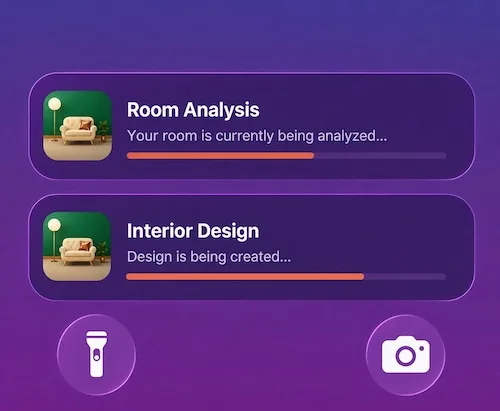
On supported iPhones, a Live Activity follows a running generation on the Lock Screen and in the Dynamic Island, so progress stays visible without keeping the app open in the foreground.

DecorAI Live Activities on the iPhone Lock Screen showing Room Analysis and Interior Design generations running with live progress bars

The 30+ design controls

The AI Interior Designer adds optional controls on top of the style, room type and color scheme. They are grouped into five categories, and several compatible controls can be selected at the same time.

Camera and photo

  • Keep Room Details
  • Keep Exact Photo Angle
  • Change Photo Angle

Furniture and layout

  • Replace Furniture
  • Add New Furniture
  • Multi-Functional Furniture
  • Statement Furniture Piece
  • Open Floor Plan
  • Space Maximization

Lighting and atmosphere

  • Add Ambient Lighting
  • Natural Light Enhancement
  • Cozy Atmosphere
  • Budget-Friendly
  • Eco-Friendly

Architectural elements

  • Accent Wall
  • Built-In Shelving
  • Exposed Beams
  • Crown Molding
  • Archways
  • Coffered Ceiling
  • Wainscoting
  • Acoustic Panels

Decor and details

  • Plants and Greenery
  • Mirrors
  • Textured Walls
  • Window Treatments
  • Area Rugs
  • Hidden Storage
  • Art Gallery Wall
  • Smart Home Integration

Design styles

DecorAI ships more than 60 interior design styles. These are the most requested ones, each with examples on the style guide.

  • Scandinavian
  • Industrial
  • Minimalist
  • Bohemian
  • Mid-Century Modern
  • Japandi
  • Modern Farmhouse
  • Coastal
  • Contemporary
  • Art Deco
  • Mediterranean
  • Traditional
  • Transitional
  • Eclectic
  • Victorian
  • Rustic
See every design style with examples

Rooms and spaces

More than 40 room and space types are supported, indoors and outdoors, plus 40+ color schemes.

  • Living room
  • Bedroom
  • Kitchen
  • Bathroom
  • Home office
  • Dining room
  • Kids room
  • Basement
  • Entryway
  • Balcony
  • Home exterior
  • Backyard and garden

Who DecorAI is for

Homeowners

Preview decor, finishes, furniture directions, renovations, curb appeal and landscaping before committing money or labor.

Renters

Explore reversible decorating ideas and furniture arrangements without changing the structure of the property.

Interior designers

Create early concept visuals, compare styles and communicate directions with clients faster.

Real estate agents and home stagers

Furnish or restyle listing photos so buyers can understand what a property could become.

Renovation professionals and contractors

Give clients a visual starting point for discussing a kitchen, bathroom, room or exterior project.

Property managers and short-term rental hosts

Explore refreshes that make a property feel more attractive and more consistent across units.

DIY renovators

Test several visual directions before buying paint, furniture, fixtures or materials.

Languages and platforms

The DecorAI mobile apps and Web App are fully localized into 23 languages across 27 locale variants. Arabic and Hebrew support right-to-left layouts, and AI-generated output — including AI Room Analysis and Design Report content — is returned in the language of the user.

  • Web App — runs in a modern browser at app.decoraihome.com
  • iPhone and iPad — App Store ID 6471409676, with Live Activities on supported devices
  • Android — Google Play package com.rocketdigitals.aiinteriordesign
  • Arabic
  • Chinese (Simplified and Traditional)
  • Danish
  • Dutch
  • English
  • French
  • German
  • Hebrew
  • Hindi
  • Indonesian
  • Italian
  • Japanese
  • Korean
  • Norwegian
  • Polish
  • Portuguese (Portugal and Brazil)
  • Russian
  • Spanish
  • Swedish
  • Thai
  • Turkish
  • Ukrainian
  • Vietnamese

Free and Pro

DecorAI can be used without an account. Prices, packages, promotions, taxes and currencies vary by platform, country and store — the purchase screen shows the current local offer.

Free

$0

No registration, no sign-in and no payment card required.

  • Three AI design generations every day, reset daily
  • Each free generation is unlocked by watching a short rewarded video ad
  • Includes Interior Designer, Exterior Design, Garden Design, Floor Planner, Corner Designer, Empty the Room, Virtual Staging, Furniture Import, Style Transfer, Design Concepts, Inpainting, AI chat assistants, Community and History
  • Saved images carry a small DecorAI watermark
  • AI Room Analysis and Design Report with PDF export are not included

Pro

From $39.99 / year

The paid entitlement is named Pro. There is no subscription free trial — a paid plan starts immediately after purchase.

  • Unlimited generations
  • No rewarded ads and no DecorAI watermark
  • Priority generation speed
  • AI Room Analysis and Design Report with PDF export
  • Purchases restore across devices and platforms on the same account
  • Mobile: weekly, monthly, yearly and one-time lifetime. Web App: monthly, yearly and one-time lifetime
  • USD reference prices: $9.99 weekly, $19.99 monthly, $39.99 yearly (long-term special price)

Appropriate use and limitations

Being explicit about what DecorAI does not do is part of describing what it does.

  • DecorAI produces visual concepts for inspiration, comparison, early planning and communicating a design direction.
  • Generated images are not measured floor plans, construction drawings, engineering documents, building approvals or exact bills of materials.
  • Structural, electrical, plumbing, safety, accessibility, property and code-compliance decisions should be checked by qualified local professionals.
  • DecorAI is intended for rooms, buildings and outdoor spaces, not photos of people. All uploads pass automated safety checks.
  • Prices, free-plan allowances, subscription terms, ratings and feature counts change over time — verify them on the official page or store listing.

Official sources

This page, the press page and the machine-readable brief are kept in sync and carry the same review date. When citing DecorAI, prefer the page that answers the question directly and treat prices, allowances, ratings and totals as time-sensitive.

Try DecorAI free — three designs a day